
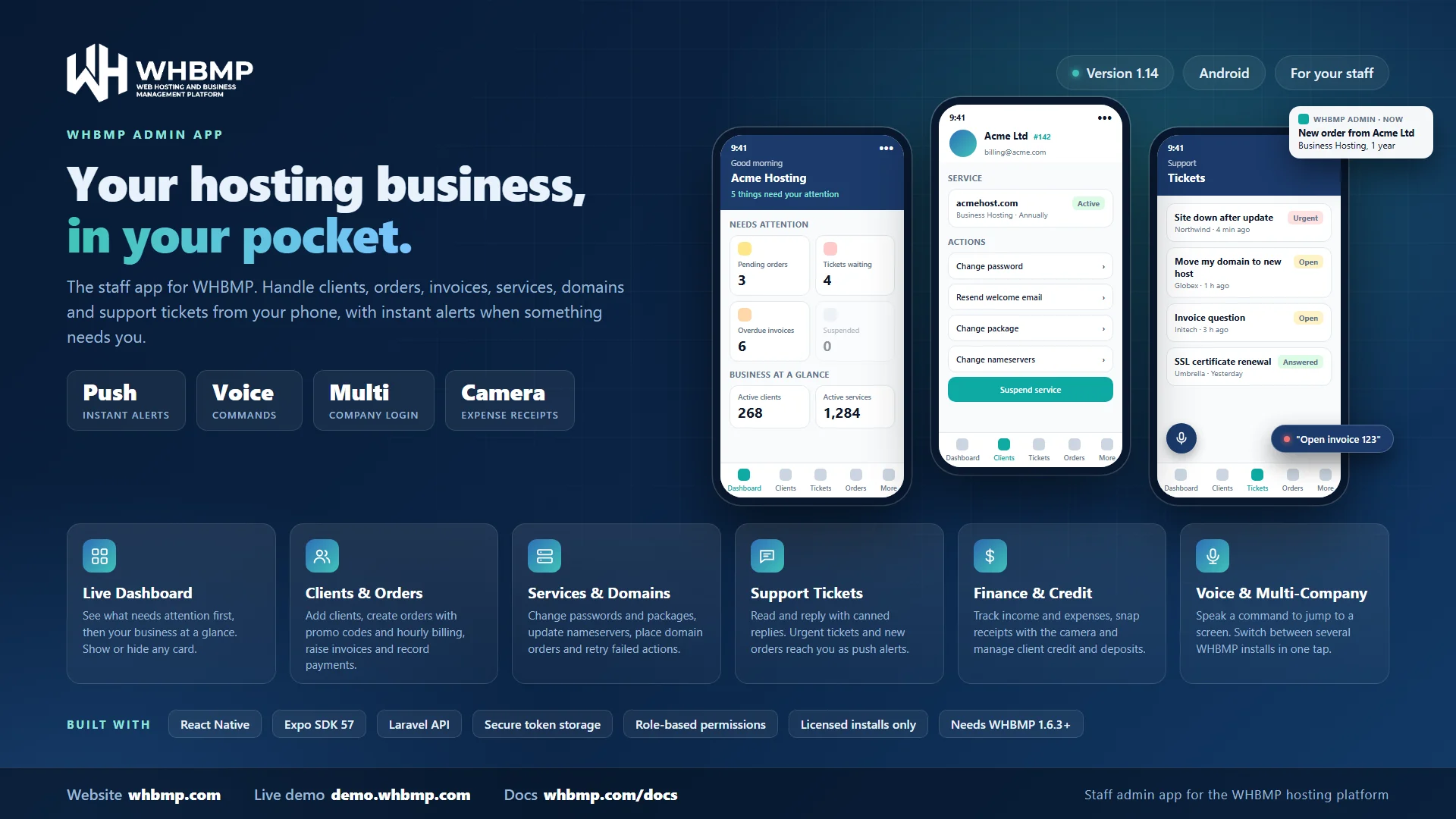

WHBMP Admin App
Run your hosting business from your phone
Version 1.17.0
The WHBMP Admin App puts your hosting business in your pocket. Check on orders, answer tickets, send invoices and look after clients from your phone, whether you are at your desk or on the move. It connects to your own WHBMP installation, so your data stays on your server.
What you can do
- Dashboard: see your key numbers at a glance, under your company name.
- Clients: browse and search clients, open a profile, add a new client, and contact them by call, SMS or WhatsApp from your own number.
- Orders and invoices: place product and domain orders for a client, apply promotion codes, create invoices and track payments and credits.
- Support tickets: read and reply to tickets, use canned replies, and open new tickets for clients.
- Services: view each service, set or generate a control panel password, resend the welcome email and change a client's package.
- Domains: check renewal dates, add-ons, contacts and notes, and change nameservers.
- Module queue and to-do: retry or resolve pending actions and keep your own task list.
- Push notifications: get an alert on your phone when a new order arrives or a ticket is marked urgent.
- Several companies: save more than one WHBMP installation and switch between them in a tap.
- Expenses Management: Manage your hosting business from your mobile. Simply add expenses and upload invoices/recipt.
What each person sees follows the permissions set for their staff account in WHBMP.
- Install the WHBMP Admin App on your Android phone.
- Open the app and enter the address of your WHBMP installation, for example
billing.yourcompany.com. - Sign in with your staff email and password.
- Allow notifications when asked, so new orders and urgent tickets reach you straight away.
The app works with WHBMP 1.6.3 or newer. Some features need a newer version of WHBMP: changing nameservers needs 1.6.5, and placing domain orders and using promotion codes needs 1.6.7. Your installation must also have an active WHBMP license.
Version 1.17.0 · Nov 1, 2026
New Features
- Quotes: A new Quotes list under More > Billing, filtered by Draft, Sent, On Hold, Accepted, Declined and Expired, with search by number or subject.
- Quotes: Open a quote to see its lines and totals, change its status (including On Hold), email it to the client as a PDF, or contact the client.
- Quotes: Add Quote on a client makes a quote with a subject, lines and a validity period. It is saved as a draft.
- Share link: Share quote link on a quote and Share payment link on an invoice open WhatsApp with a ready message and a private link, addressed to the client. More opens the phone's share sheet for any other app. The client opens the link with no login to accept the quote or pay the invoice.
- Share link: The link stops working by itself when the invoice is paid or cancelled, or the quote is accepted, declined or expired.
Notes
- Needs WHBMP 2.48.0 or newer on the website. Package choices and optional add-ons on a quote are set up on the web; the app shows them and uses the default choices.
Version 1.16.0 · Oct 26, 2026
Changes
- License: The app now checks with whbmp.com that the website it connects to has a valid WHBMP license. A website without one is refused, with a message on the sign-in screen.
- License: The answer is remembered for 6 hours, and the app keeps working for 3 days if whbmp.com cannot be reached, then asks for a connection.
- License: Local test sites and WHBMP's own sites are not checked.
Version 1.15.1 · Oct 24, 2026
Fixes
- Dashboard: Earnings this month showed a wrong figure on a site that takes payments in more than one currency, because the payments of every currency were added together and the total was written with a dollar sign. The card now shows the site's default currency with its own symbol, and the other currencies that took payments this month are written under it.
- Payments: Tapping the Earnings card opens the payments of that currency, so the list adds up to the card. The total at the top of the list is shown only for one currency.
- Notes: Needs WHBMP 2.31.4 or newer. On an older site the card still shows the old combined figure, written with a dollar sign, until the site is updated.
Version 1.15.0 · Oct 24, 2026
Changes
- Domains: When the site is set to Don't sell domains, the app hides the Domains screens: the Domains row on More, the Active Domains card on the Dashboard, the Domains tab on a client and Add Domain Order. Voice commands for domains go with them.
- Domains: A site that only stopped selling domains (register and transfer switched off) keeps the Domains screens, because the domains its clients already have still need managing.
- Notes: Needs WHBMP 2.31.0 or newer; on older sites nothing changes.
Version 1.14.0 · Oct 22, 2026
Changes
- Client > Credit: Funds can no longer be added without the payment details. Add Funds now asks for the amount, the payment method, the transaction ID, the date of payment and an optional note, and adds the credit at once because it records money that has already arrived. The same payment cannot be recorded twice.
- Client > Credit: A payment the client reported on the site shows with the details they gave. Check the method and the transaction ID (you can correct them), then tap Confirm payment to add the credit.
- Notes: Needs WHBMP 2.28.0 or newer.
Version 1.13.0 · Oct 22, 2026
New Features
- Create Order: Products sold by the hour offer Pay hourly in the Billing Cycle list. The Order Summary shows the hourly rate (up to 6 decimals), the monthly cap and any minimum deposit the client has to hold in account credit before the server is created.
- Service: A service sold by the hour shows its rate, monthly cap, the hours and cost so far this month, what is not invoiced yet and when its clock started.
- Client: A new Credit tab shows the client's account credit, how much their hourly servers paid from credit use an hour and about how many hours the credit lasts, and the credit history.
- Client: Add Funds makes a deposit that waits for the payment. It is not an invoice. When the money arrives, tap Mark received and the credit is added to the client's account, or cancel the deposit.
- Notes: Needs WHBMP 2.27.0 or newer for the Credit tab and 2.24.0 or newer for the hourly rate on orders and services; older sites simply do not show them.
Version 1.12.0 · Oct 20, 2026
Improvements
- Create Order and Orders: Billing cycles you add under Settings > Billing Cycles show by the name you gave them, in the Billing Cycle list, the Order Summary and an order's items.
- Notes: Needs WHBMP 2.18.2 or newer for the names; on older sites the app makes a readable name from the cycle's key.
Version 1.11.0 · Oct 20, 2026
Improvements
- Create Order: Billing cycles you add under Settings > Billing Cycles (days, weeks, months or years) now appear in the Billing Cycle list, in the order your site lists them.
- Create Order: The setup fee shown in the Order Summary is the one for the billing cycle you pick, so the total matches the order the site creates.
- Orders: An order's items show the billing cycle by name instead of its internal key.
- Notes: The per-cycle setup fee needs WHBMP 2.7.0 or newer; on older sites the app keeps using the product's single setup fee.
Version 1.10.0 · Oct 14, 2026
New Features
- Dashboard: A fresh look. A header with today's date and a one-line summary of how many things need your attention, and cards with icons. Cards showing zero fade back so the ones that need you stand out.
- Dashboard: New "Business at a glance" cards: active clients, active services, active domains, unpaid invoices and your own to-dos, plus income and spending this month when Finance & Expenses is on. Each opens its list.
- Dashboard: New Failed Module Actions card.
- Dashboard: Tap the sliders button in the header to show or hide any card or panel. Your choice is saved on your phone.
Improvements
- Dashboard: Pull down to refresh also refreshes the new cards. Cards you switch off are not loaded.
- Dashboard: Log out now lives only on the More tab.
Version 1.9.0 · Oct 14, 2026
New Features
- Finance & Expenses: The overview now shows income (paid invoices) and spending for this month and this financial year, each compared with last month or last year, and a Tax charged card when your business charges tax.
- Expenses: Choose a vendor on an expense and its currency, category, tax and commission fill in. For an expense in another currency you can enter its value in your main currency; it is suggested from your exchange rates and marked as an estimate until you change it.
- Bills: Mark a recurring bill paid with the date and the real amount, or skip it. Overdue bills are flagged on the overview.
Improvements
- Expenses: The tax fields appear only while your business charges tax, and an expense's details show the tax included in its amount.
- Expenses: Gateway fees show as automatic expenses that follow their payment.
- Notes: Needs Finance & Expenses 1.2.0 on your site (WHBMP 2.5.0 or newer).
Version 1.8.3 · Oct 11, 2026
Bug Fixes
- Voice commands: Opening a client by name or by ID, such as “open client Ethan Johnson” or “open client 1063”, now works. In 1.8.2 it always answered “No client found”.
Version 1.8.2 · Oct 11, 2026
Improvements
- Clients: Each client's ID now shows in the client list and at the top of the client's profile.
- Voice commands: Say a client's ID to open them, for example “open client 1063”.
Bug Fixes
- Voice commands: “Open client John Smith” now finds the client when you say the first and last name together. It also finds clients by company or e-mail, includes inactive clients, and suggests the closest matches if one word is misheard.
Version 1.8.1 · Oct 11, 2026
Bug Fixes
- Voice commands: The microphone button now sits at the bottom left, so it no longer covers the + button on a client's profile.
Version 1.8.0 · Oct 11, 2026
New Features
- Voice commands: Tap the microphone button, say what you want and it happens. Open an invoice, order or ticket by number, a client or hosting service by name or domain, or jump to a section such as unpaid invoices or pending orders.
- Voice commands: Suspend or reactivate a hosting service by saying its domain, for example “suspend abcd.com”. A confirmation card always appears first, and nothing changes until you tap Confirm.
- Voice commands: Prefer not to talk? Type the same command in the same panel.
Notes
- Languages: Voice commands understand English for now.
- Permissions: The phone's own speech service listens for your voice, so the first use asks for microphone access. On most Android phones that service is Google's and needs an internet connection unless an offline language pack is installed.
- Permissions: Voice commands can only open or change what your staff account has permission for.
Version 1.7.0 · Oct 11, 2026
New Features
- Expenses: See this month's spending and gateway fees, where the money went and a six-month trend, one currency at a time.
- Expenses: Browse, search and filter expenses by type and category, with totals for what you are looking at.
- Expenses: Add, edit and delete expenses from your phone.
- Receipts: Attach a receipt by taking a photo, choosing a picture or picking a file such as a PDF, and open it again later.
- Recurring: See the recurring expenses coming due in the next 30 days.
Notes
- Expenses: Expenses appears in More only when the Expenses plugin (1.1.0 or newer) is installed and active on your WHBMP installation and your staff account has the Expenses permission.
- Payments: Gateway fees are shown but cannot be edited, the same as in the web admin.
- Permissions: The app asks for camera access the first time you photograph a receipt.
Version 1.6.0 · Oct 11, 2026
New Features
- Push notifications: Get an alert on your phone when a new order arrives or a ticket is marked urgent. Tapping the alert opens the right section, even when it comes from another saved company.
Improvements
- Notifications: The app asks for permission once after you sign in, and keeps working normally if you decline.
Version 1.5.0 · Oct 7, 2026
New Features
- Domains: Change a domain's nameservers from its page, using two to five nameservers or the default ones.
- Orders: Add a domain order for a client. Register or transfer one domain with the years, EPP code, add-ons and a live price summary.
- Orders: Choose a promotion code on product and domain orders and see the discount before you place the order.
Improvements
- Dashboard: Your company name is shown at the top.
- Domain orders: The app now explains why extensions could not be loaded, and lists only the extensions you sell.
Notes
- Requirements: Changing nameservers needs WHBMP 1.6.5 or newer. Domain orders and promotion codes need WHBMP 1.6.7 or newer.
Version 1.4.0 · Oct 7, 2026
Improvements
- Branding: The app is now called WHBMP Admin, with a new icon, a teal color scheme and the WHBMP logo on the sign-in screens.
- Sign-in: A simpler hint under the server address field.
Version 1.3.0 · Oct 7, 2026
New Features
- Companies: Save several WHBMP installations on one phone and switch between them from More > Companies.
- Services: Set or generate a control panel password, resend the welcome email and change a client's package.
- Domains: See the renewal state, DNS management, email forwarding and ID protection add-ons, contacts and admin notes.
Improvements
- Order forms: Dropdowns are now readable in dark mode, products are grouped, and the billing cycle list shows only what the product offers.
- Services: Lists and client profiles show the product name instead of only the domain.
Bug Fixes
- Clients: Tapping a domain on a client's profile now opens it.
- Sign-in: Cancelling Add Company or changing the server no longer signs you out of a session that is still valid.
Version 1.2.0 · Sep 21, 2026
New Features
- More tab: Services, Domains, Pending Module Actions, To-Do, Invoices, Payments and Credits in one place.
- Domains: A domain list with a detail page for each domain.
- To-Do: Add, complete and delete your own tasks.
- Credits: See client credits.
- Clients: Add a new client.
- Contact: WhatsApp, text and call buttons on a client, and a ready-made payment reminder on an invoice.
- Tickets: Insert canned replies into a ticket reply without overwriting what you typed.
- Search and filters: Every list has a search box and status filters.
Improvements
- Lists: More rows load as you scroll, instead of stopping at the first 25.
- Access: Sections you do not have permission to use are hidden.
Bug Fixes
- Navigation: Services, Invoices and Payments can now be opened directly instead of only through another screen.
Version 1.1.0 · Sep 9, 2026
Improvements
- Dashboard: Pending Orders, Tickets Waiting, Suspended Services, Overdue Invoices and Earnings are reordered, and each card opens the list its number came from.
- Dashboard: A Pending Actions tab to retry or resolve queued actions, and a Recent Activity tab.
- Services and payments: New lists for suspended services and this month's payments, with an all-time option.
Bug Fixes
- Dashboard: The greeting is no longer hidden behind the phone's status bar.
Version 1.0.0 · Sep 9, 2026
New Features
- Connect: Enter your WHBMP server address and sign in with your staff account.
- Dashboard: A summary of your business with recent activity.
- Clients, orders, invoices and tickets: Browse them and open the details, and open a service from a client.
- Create: Place an order, create an invoice or open a ticket for a client.
WHBMP Admin App
The staff app for WHBMP: orders, invoices, clients, tickets, services and domains on Android, with push alerts for new orders and urgent tickets.
- Latest version
- 1.17.0
- Released
- Nov 1, 2026
- Addons
- 0
- Plans
- 0